Building a scalable UI foundation for an enterprise compliance platform.
Due to NDA restrictions, certain product names, visuals, and internal details have been generalized while preserving the overall design process and technical approach.
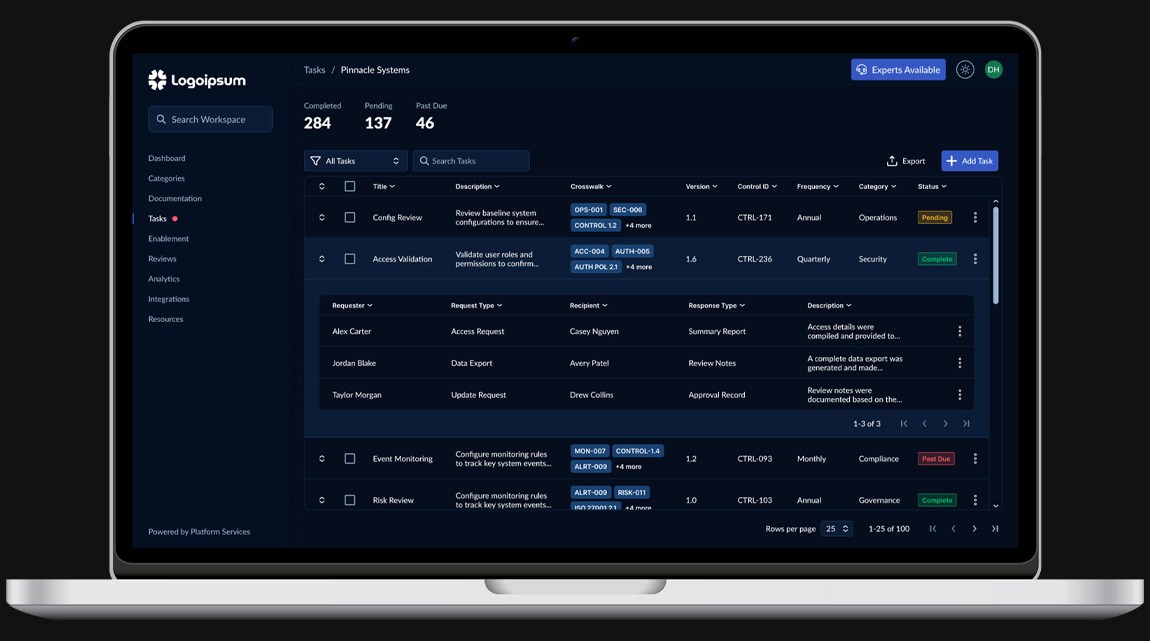
Challenge
The compliance platform had evolved over time without a unified design system, leading to an interface that became increasingly inconsistent as new workflows and features were introduced. During a broader product redesign initiative, hundreds of product screens needed to be modernized. A scalable system of components and design patterns was required to maintain consistency as the platform continued to grow.
Objectives
Establish a scalable design system foundation
Standardize UI patterns across the platform
Reduce design and development complexity through reusable components
Translate complex compliance workflows into clear interface patterns
Implement the design system directly within the production codebase
Project Scope
Design System Architecture & Platform Redesign
Tools
Figma, React, Tailwind CSS, JavaScript, HTML5, CSS3, Cursor, Claude, Git, Bitbucket, Jira, Confluence
Roles
Design System Architect, Product Designer, Frontend Engineer, UX Facilitator
Duration
2025
Role & Responsibilities
I led the design and implementation of a scalable design system for the platform as part of a broader product redesign initiative, standardizing over 180 screens into a unified system of reusable templates and components. My responsibilities spanned design system architecture, product design, and frontend implementation.
Working closely with product leadership and engineering, I translated complex product workflows into scalable UI patterns reused across hundreds of product screens.
Design System Architect
Established the foundational structure of the design system using Atomic Design principles. Defined tokens, components, and layout patterns within Figma and aligned them with implementation in the codebase.
Product Designer
Converted complex product workflows into clear, usable interface patterns while introducing consistent UX standards across the platform.
Frontend Engineer
Implemented the design system within the production codebase using React and Tailwind CSS, translating design tokens and templates into reusable UI components.
UX Facilitator
Led weekly UI and UX review sessions with leadership to present new screens, validate workflows, and drive alignment across design decisions.
Establishing the Design System Foundation
Structuring the System Architecture
When the redesign initiative began, the platform lacked a unified design system. Interface patterns had evolved organically over time, resulting in inconsistencies across workflows and screens.
To create a scalable foundation for the redesign, I began by defining the core building blocks of the system using Atomic Design principles. This approach allowed the interface to be organized into a hierarchy of reusable elements, ensuring that larger components and layouts could be assembled from smaller, consistent primitives.
Defining Design Tokens
The first step in building the system was establishing design tokens within Figma using Variables. These tokens defined the foundational visual properties used throughout the interface, including color, typography, spacing, and elevation.
By defining these values at the system level, components could inherit consistent styling while remaining flexible enough to support different product workflows.
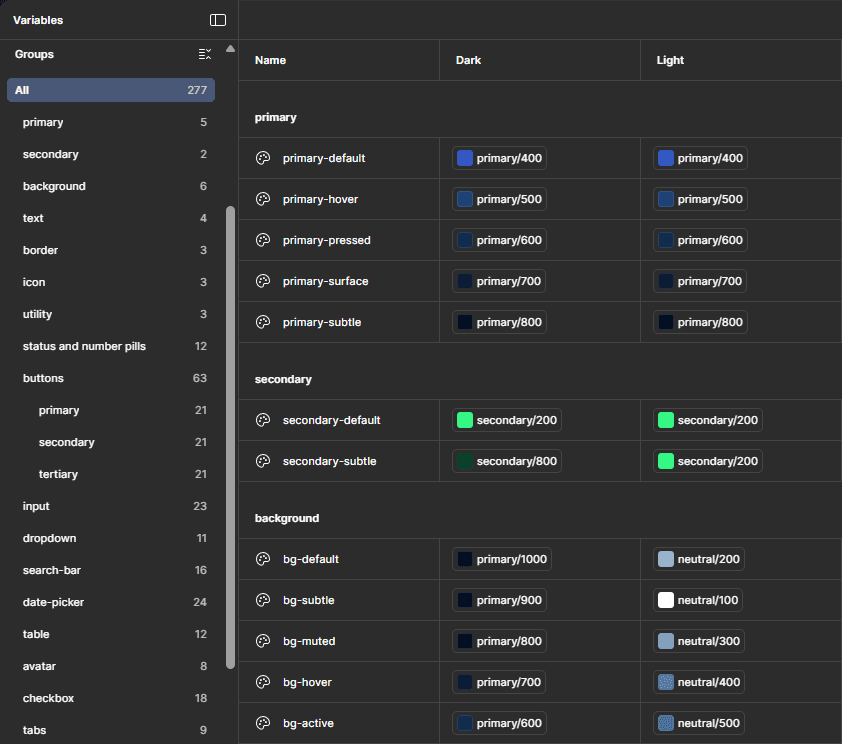
Design tokens defined in Figma Variables formed the foundation of the design system. These tokens controlled color, typography, spacing, and elevation across both light and dark themes.
Building Atomic Components
With the token system in place, I began building the first set of atomic components, including buttons, inputs, badges, and other foundational interface elements.
These components served as the base layer for more complex interface patterns that would later be composed into navigation elements, tables, and workflow layouts.
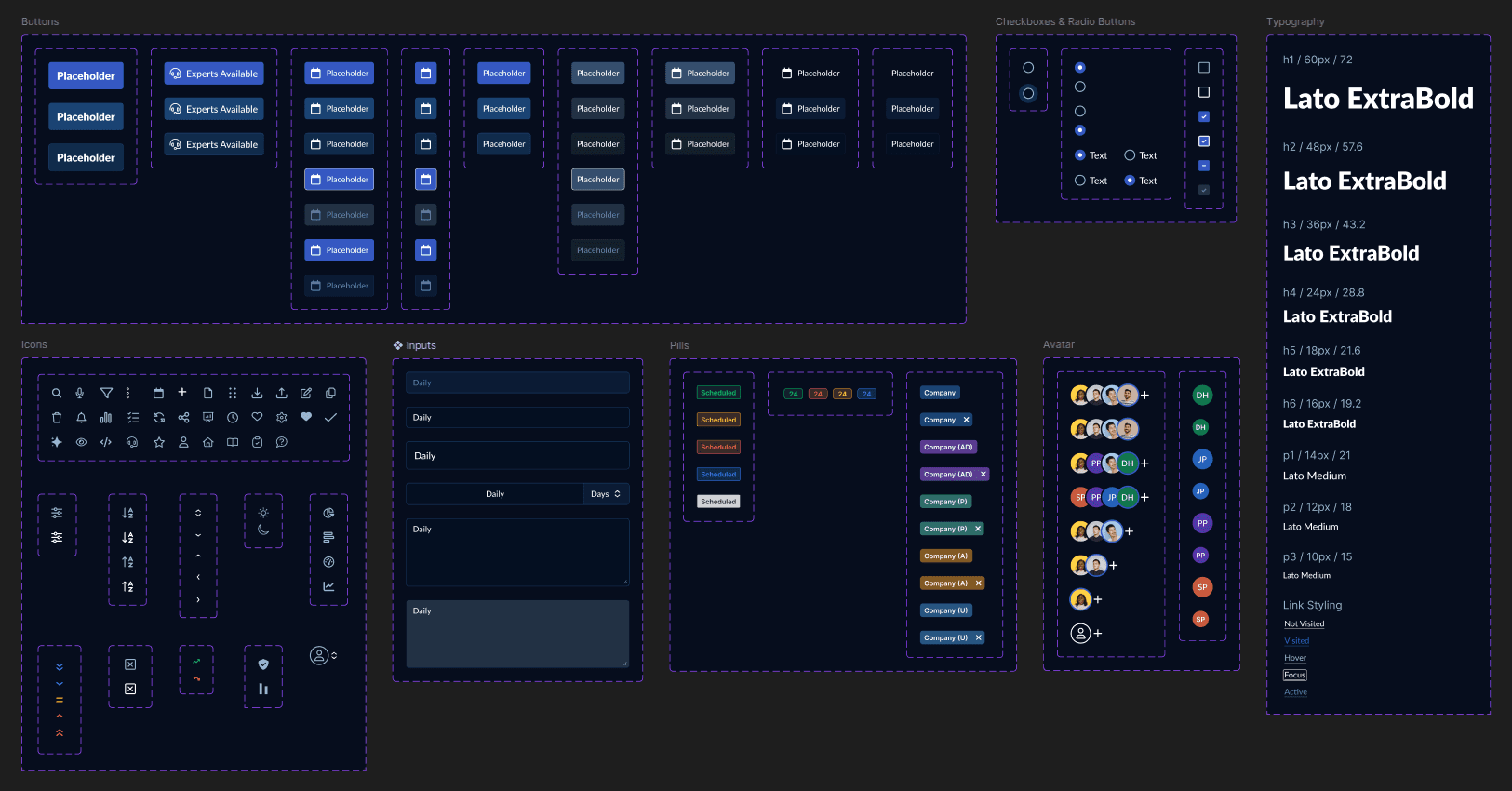
Atomic component grids from the design system showing foundational UI primitives including buttons, inputs, badges, avatars, icons, and typography styles.
Supporting Dark and Light Themes
Because the visual system was defined through centralized tokens, the interface could support multiple themes without requiring component-level redesign.
Using Figma Variables, I defined separate values for light and dark modes across the core token sets, including background surfaces, text colors, and interactive states. Components inherited these values automatically, allowing the interface to adapt across themes while maintaining consistent hierarchy and contrast.
This token-driven approach ensured that theme changes could propagate across the entire interface without requiring manual updates to individual components.
Interactive prototype demonstrating reusable table components, interaction states, and token-driven theming across dark and light modes.
Scaling the System Across Hundreds of Screens
Receiving the Initial Workflow Definitions
As the redesign initiative began, product leadership and subject matter experts documented a large portion of the platform’s workflows using wireframes in Figma. These wireframes captured the intended functionality of the system, but they were created primarily to communicate requirements rather than to define a scalable interface structure.
Over time, this resulted in a large collection of workflow screens covering dozens of product areas across the platform.
Before any design system work could scale effectively, the first step was understanding the full scope of these workflows and how they related to one another.
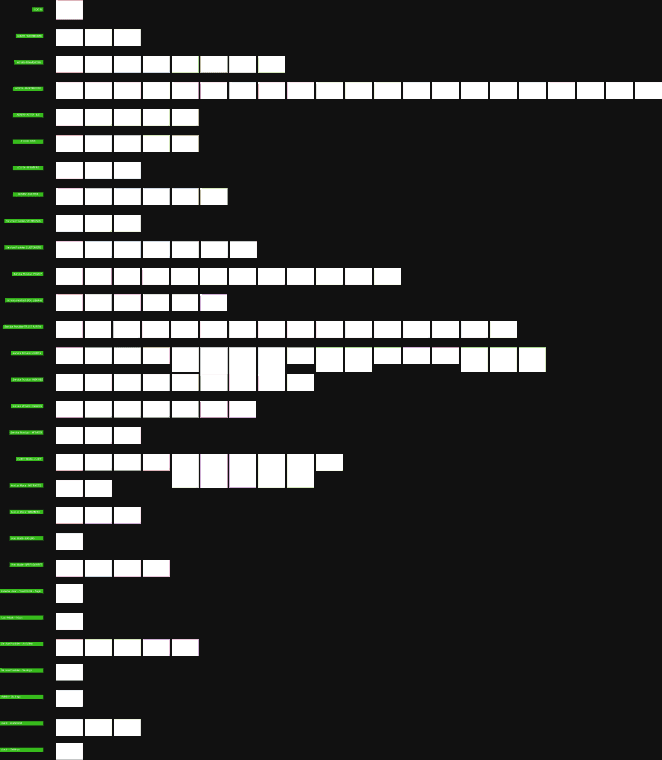
Wireframes were grouped by workflow (shown in green) to reveal repeating interface patterns that informed the design system structure. Original screen content has been redacted for NDA compliance and replaced with neutral placeholders.
Organizing 180+ Screens into System Templates
As the redesign initiative began, product leadership and subject matter experts documented a large portion of the platform’s workflows using wireframes in Figma. These wireframes captured the intended functionality of the system, but they were created primarily to communicate requirements rather than to define a scalable interface structure.
Over time, this resulted in a large collection of workflow screens covering dozens of product areas across the platform.
Before any design system work could scale effectively, the first step was understanding the full scope of these workflows and how they related to one another.
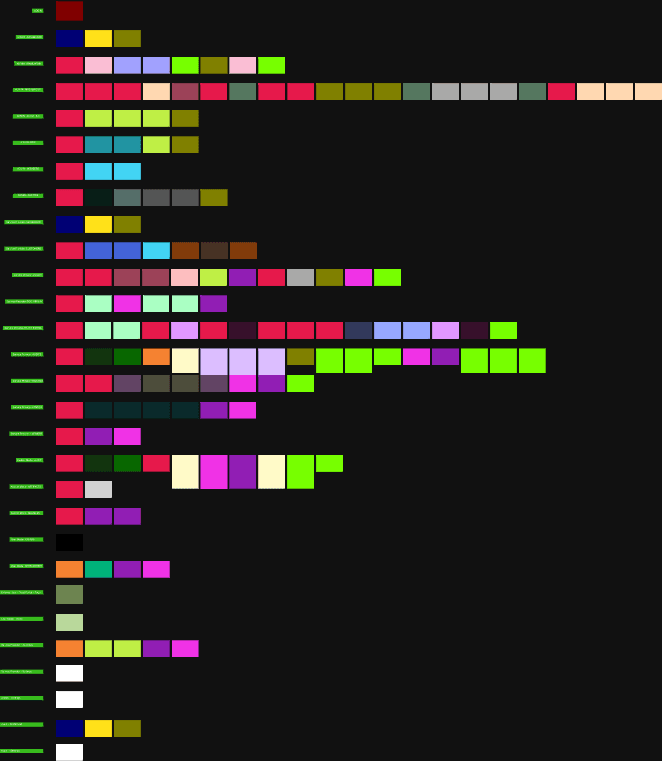
Each workflow screen was color-coded by interface pattern to identify recurring UI structures across the platform. This analysis revealed the foundational templates and components needed to support the system at scale.
Identifying Reusable Interface Patterns
Once the workflows were organized, the next step was identifying the recurring interface structures across the platform. Although more than 180 individual workflow screens had been documented, many of them were built from the same underlying layout patterns.
By analyzing the grouped screens and color coding common UI structures, it became clear that the majority of workflows could be supported by a much smaller set of repeatable interface templates. Tables, detail views, form layouts, navigation structures, and status panels appeared consistently across different product areas.
This analysis allowed the total number of screens requiring unique design work to be reduced from more than 180 workflow screens down to just 42 standardized templates.
Reducing the interface into a smaller set of reusable structures made the scope of the redesign significantly more manageable and created a clear foundation for implementing the design system across the platform.
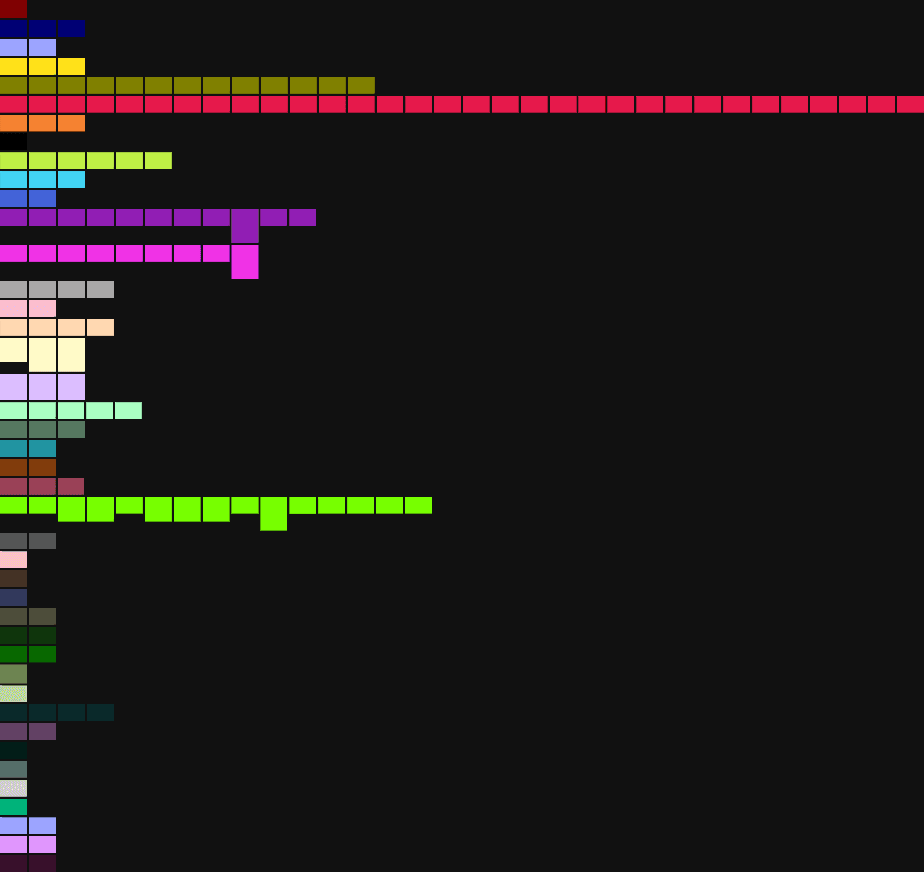
The identified interface patterns were organized into standardized templates and tallied to support effort estimation and implementation planning.
Estimating the Scope of the Redesign
Once the templates were defined, each one was logged in a planning spreadsheet to estimate the effort required for implementation. The sheet tracked how many workflow screens mapped to each template, which user modes the template supported, and the level of complexity involved in building the interface.
To estimate effort consistently, each template was evaluated using the Efficient Frontier matrix, a prioritization framework I developed to score work based on interface complexity and variation within a template group. (A deeper explanation of the framework is documented in the Efficient Frontier field notes.)
Two factors were used to generate each template’s score:
Interface Complexity
Reflects the structural difficulty of the layout and component composition. Higher scores indicate interfaces that require more time to construct and standardize due to complex layouts, custom components, or intricate interaction patterns.
Variation Within Template Group
Measures how inconsistent the original wireframes were within a group of related templates. Lower scores indicate highly uniform screens, while higher scores represent workflows that required consolidation or redesign to establish a consistent structure.
These inputs produced a final score that mapped to a corresponding effort range in hours and story points. This scoring system allowed the redesign work to be prioritized and scoped with greater accuracy while also providing a shared reference for planning discussions with engineering and product stakeholders.
Through this process, the original set of more than 180 workflow screens was translated into 42 standardized templates with defined implementation estimates, creating a clear roadmap for design completion and development handoff.
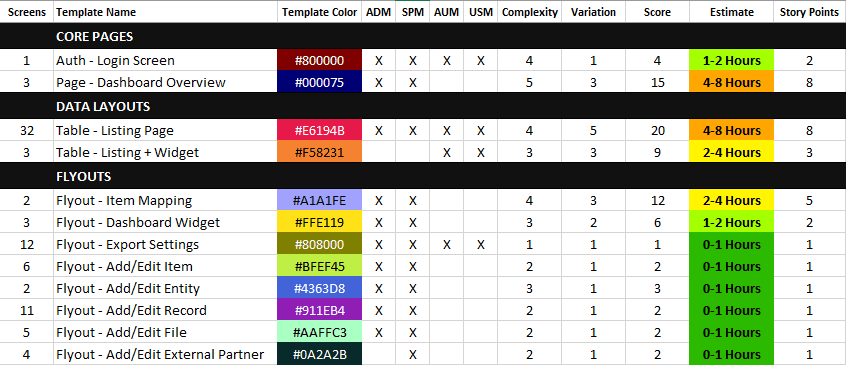
Workflow screens were mapped to standardized templates and scored to estimate redesign effort using the Efficient Frontier framework. The table shows a representative subset of the full template library. Template names have been generalized for NDA compliance.
Standardizing Interface Patterns and Refining the User Workflows
With the templates defined and the redesign effort estimated, the next step was translating the template system into actionable work for the redesign phase. Each standardized template was converted into a dedicated Jira ticket, allowing the work to be tracked, prioritized, and implemented systematically.
These templates served as the foundation for refining the original workflow wireframes. Because many screens had been created independently during the requirements gathering phase, inconsistencies had emerged in layout structure, component placement, and interaction patterns. Applying standardized templates allowed these variations to be resolved while preserving the intended functionality of each workflow.
By consolidating more than 180 workflow screens into a structured set of reusable templates, the redesign effort became significantly more manageable. Instead of designing each screen individually, the work could focus on refining a smaller set of interface patterns that would scale across the platform.
This approach created a clear bridge between the initial workflow documentation and the broader implementation effort, where the standardized templates were later integrated across the full platform experience.
Converting Templates into Redesign Work
Each standardized template was converted into a dedicated Jira ticket to track the redesign work. These tickets included the template definition, associated workflow screens, and estimated effort derived from the scoring framework. Organizing the work this way allowed the redesign to be executed systematically rather than redesigning each screen individually.
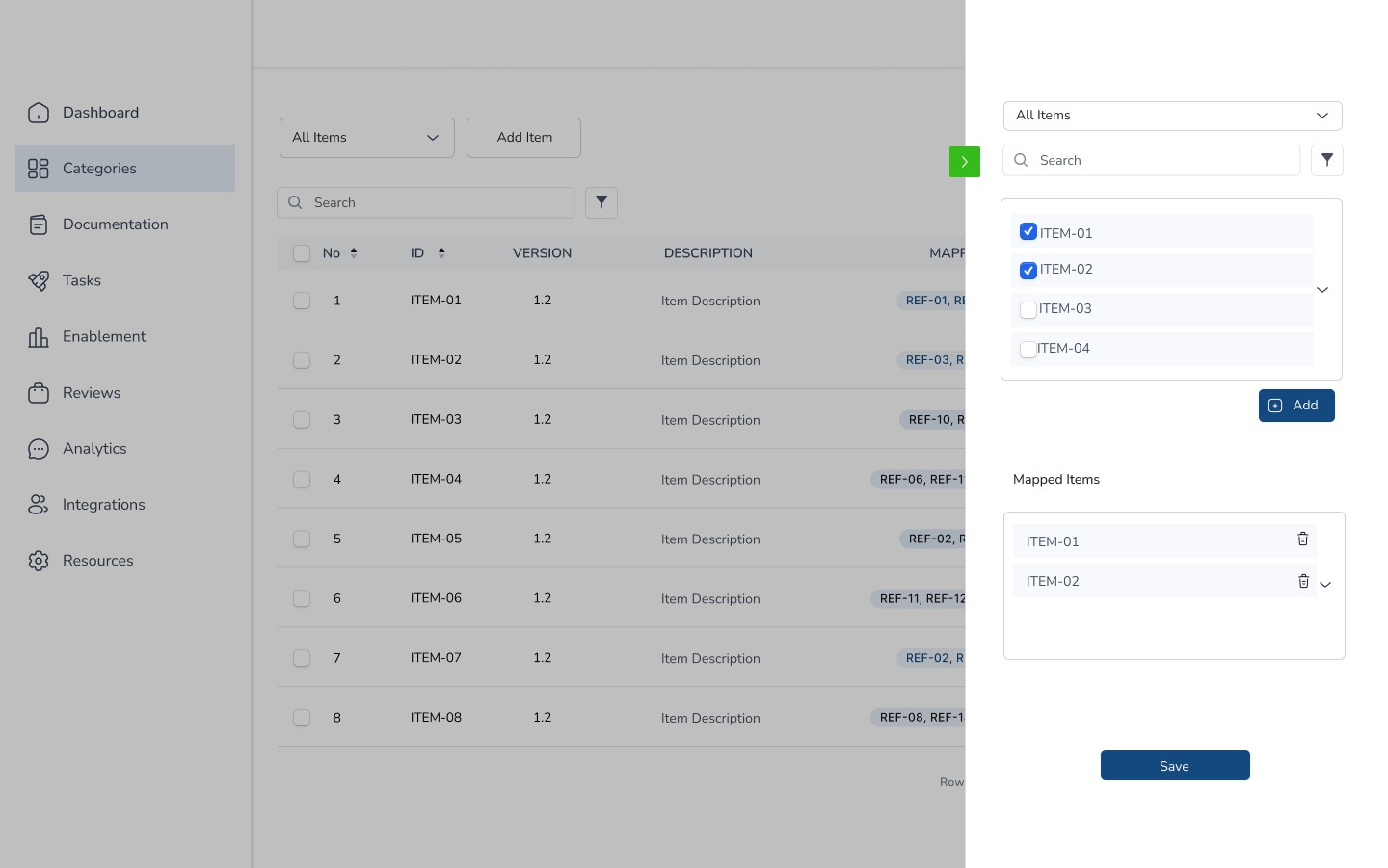
Example workflow wireframe created by a subject matter expert during requirements gathering. Terminology and content have been generalized for NDA compliance.
Applying Templates to Workflow Screens
The templates were then applied to the workflow screens originally documented by subject matter experts. These early wireframes captured the functional requirements of the platform but often contained inconsistencies in layout structure and interaction patterns. By applying the standardized templates, these screens were refined into a consistent interface while preserving the intended workflow functionality.
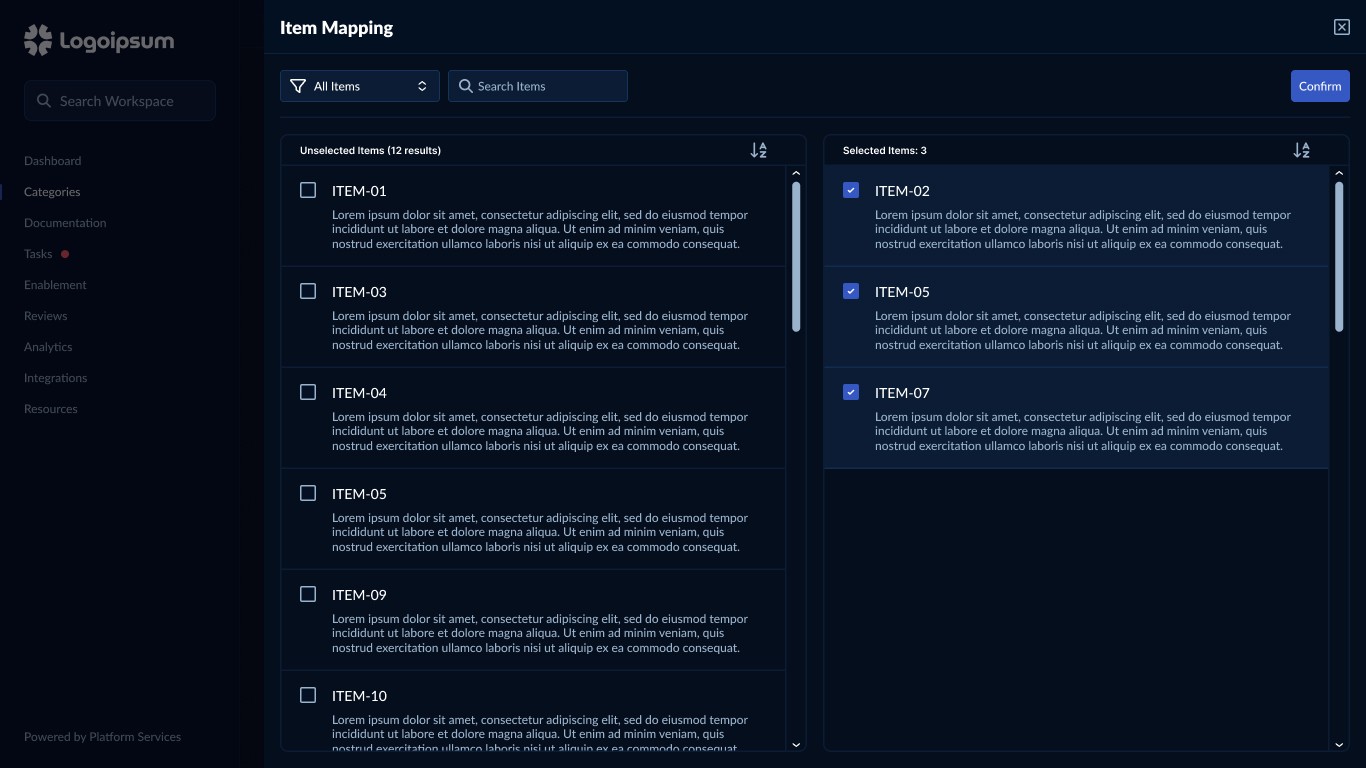
Example workflow screen refined using a standardized interface template derived from the design system. Terminology and content have been generalized for NDA compliance.
Implementation Specifications
Structured Engineering Handoff
Once the wireframe templates were standardized, the next step was preparing them for development. Rather than relying on informal design handoffs, I created a structured implementation framework in Jira to translate each template into clear, repeatable engineering specifications.
In total, 42 templates were documented and converted into individual Jira tickets. Each ticket served as a complete implementation reference, outlining the layout rules, token usage, UI states, and interaction behaviors required to build the interface consistently.
To maintain consistency across development, every ticket followed a standardized structure. This ensured engineers could implement templates using the same design system conventions rather than interpreting each layout independently.
Each implementation specification documented:
Design tokens used for spacing, typography, colors, and UI states
Layout rules and spacing standards for the template structure
Supported platform modes, such as Admin and Provider views
Interaction behaviors, including sorting, selection states, and expandable content
Links to the relevant Figma wireframes and design resources
References to the Templates sitemap spreadsheet, which tracked where each template appeared across the platform
By documenting each template in this way, the design system transitioned from a collection of visual patterns into a repeatable implementation framework that could scale across the application.
Snippet from a standardized Jira ticket used to document template implementation. Each ticket included token references, component mappings, layout rules, and interaction behavior. Content has been redacted for NDA compliance.
Tracking Template Implementation
To support the rollout of the standardized templates across the platform, I created a centralized tracking spreadsheet that mapped existing screens to their corresponding templates. This tracker provided visibility into where each template was implemented and which parts of the application were still using the legacy interface.
Each row represented a screen within the platform and documented the original screen name defined by the subject matter expert, the standardized template applied during the design system effort, and the workflow where the screen appeared. The spreadsheet also tracked the interface status, indicating whether the screen was still using the old UI or had been migrated to the new template-based system.
This structure made it possible to monitor progress across the application while ensuring templates were applied consistently. It also helped identify areas where multiple screens could share the same template, reinforcing the goal of reducing design and implementation variability.
By maintaining this tracker alongside the Jira implementation specifications, the design system rollout could be coordinated across development, design, and QA while keeping the migration process transparent and organized.
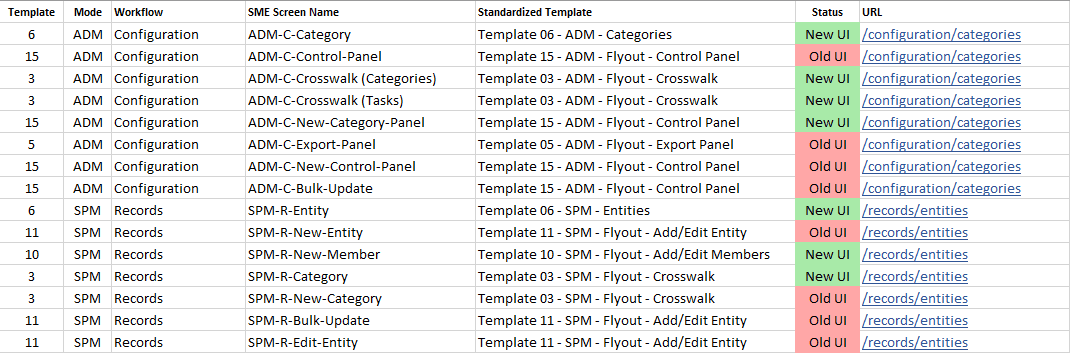
Template implementation tracker used to map SME-defined screens to standardized templates and monitor migration from the legacy interface to the new design system.
Implementing the Design System in Code
Bringing the System into the Codebase
Once the implementation specifications and rollout tracker were in place, the next phase focused on applying the standardized templates and design tokens within the application. The platform used a React frontend with Tailwind CSS for styling, allowing the design system to function as a shared set of reusable primitives across the interface.
Rather than treating implementation as a one-off effort, this phase followed the same system-driven approach established earlier. Each template was built using the specifications defined in Jira, ensuring that layout rules, token usage, and interaction patterns were consistently translated into working UI.
Translating Design Tokens into Tailwind
The design tokens defined through Figma Variables served as the foundation for the interface’s visual language, including color, typography, spacing, and elevation. These tokens were mapped into the Tailwind configuration so they could be referenced consistently throughout the application.
Rather than relying solely on raw utility classes, I implemented a hybrid approach that combined Tailwind’s configuration system with semantic utility classes aligned with the design system. This allowed the underlying token values to remain centralized while providing developers with meaningful classes that reflected common interface patterns.
By aligning Tailwind configuration with the design tokens defined in Figma, the same visual primitives could be applied consistently across components and templates within the application.
Tailwind Token Mapping
Tailwind configuration mapping semantic design tokens to utility classes, enabling consistent styling across components and templates.
Light and Dark Theme Variables
CSS variables defining token values with the dark theme as the default, and light theme overrides applied via a class-based approach.
Implementing Reusable Interface Components
With the token system in place, the next step was implementing reusable UI components within the React codebase.
Many of the standardized templates introduced during the wireframe phase were translated into reusable interface patterns. These components included common structures such as tables, form panels, flyouts, and data management screens.
Some components leveraged existing Material UI elements already present in the platform, while others were implemented using Tailwind-based styling to align with the design system tokens.
These reusable components allowed interface patterns defined during the design phase to be consistently applied across multiple workflows.
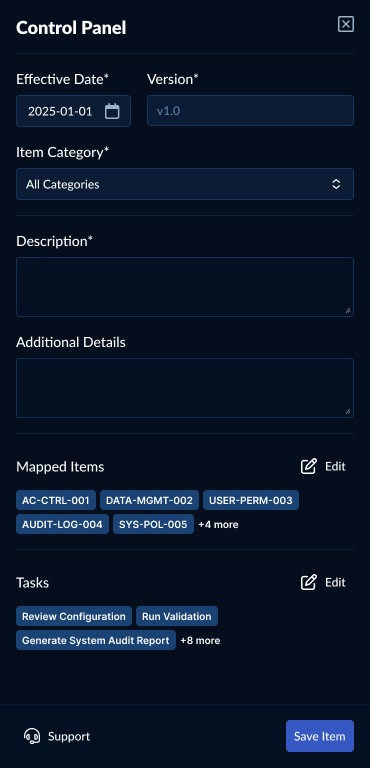
Example flyout template implemented as a reusable React component, where standardized layout structure and interaction patterns are combined with token-based Tailwind styling. Content and terminology have been generalized for NDA compliance.
Applying Templates Across Workflows
As development progressed, the standardized templates were applied across multiple workflows within the application, including both Admin and Provider views.
Because each template was implemented as a reusable React pattern backed by shared design tokens, new screens could be assembled using existing system components rather than being designed and built from scratch. Common interface structures such as flyouts, screen layouts, and data groupings were reused across workflows, ensuring consistency in both layout and interaction.
This approach allowed the same template to support different use cases with minimal variation, while still accommodating workflow-specific content and data. By separating structure from content, the system remained flexible without sacrificing consistency.
As a result, new features could be delivered more efficiently, with reduced design and development overhead. The interface remained visually and structurally consistent as the product expanded, reinforcing a cohesive user experience across the platform.
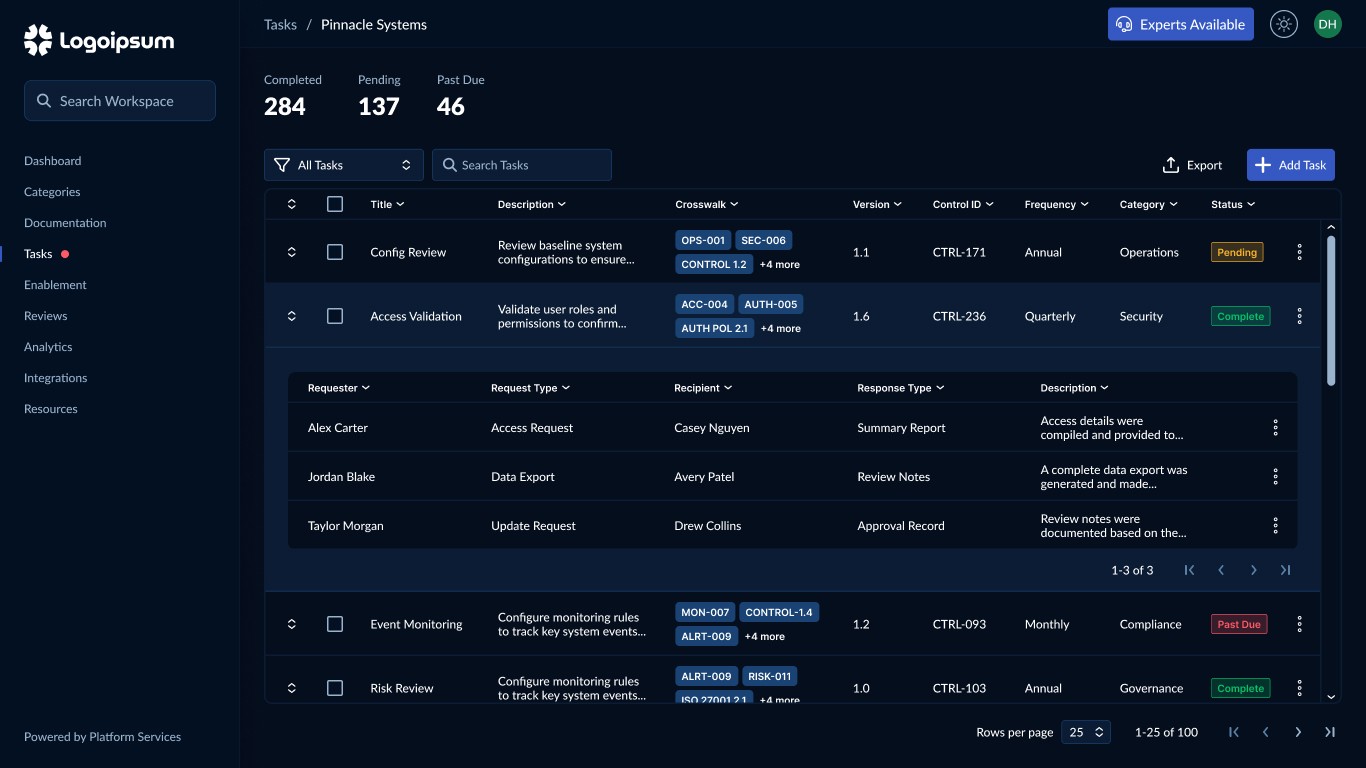
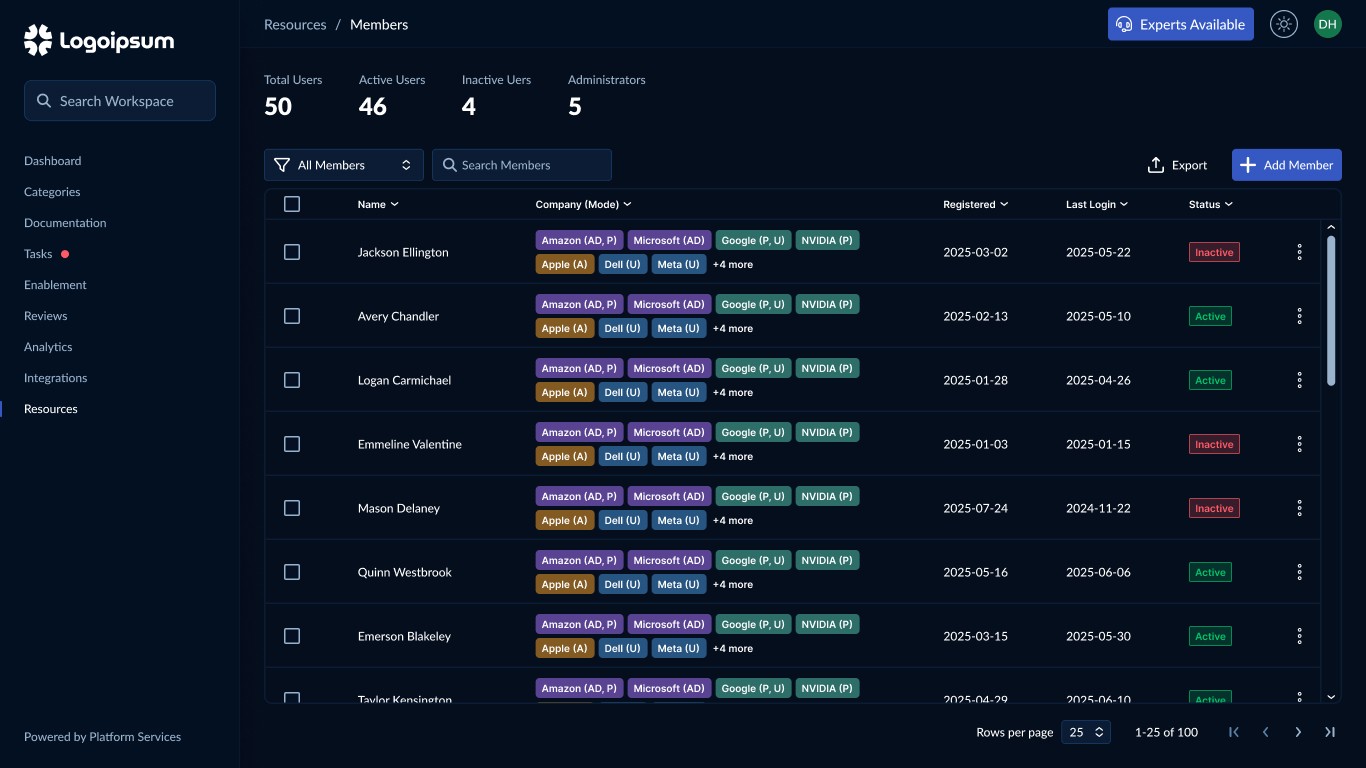
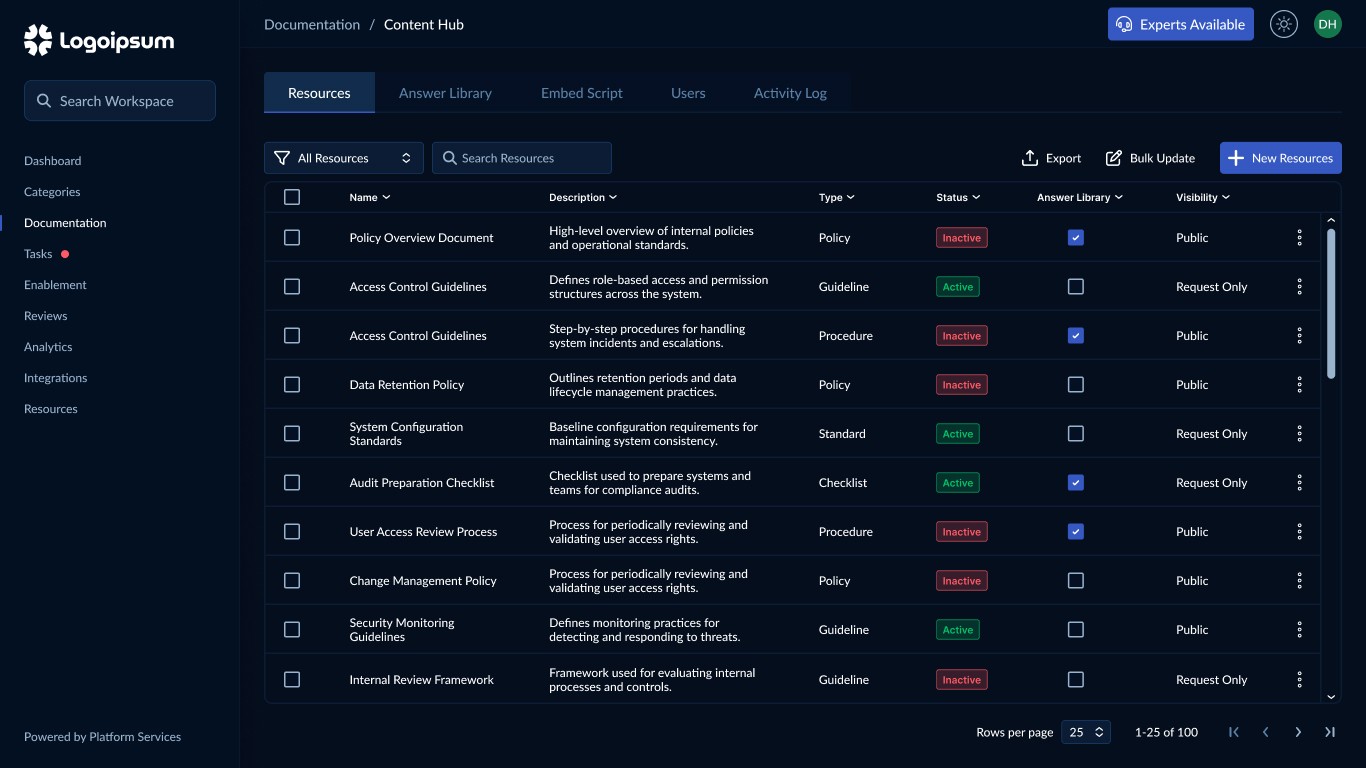
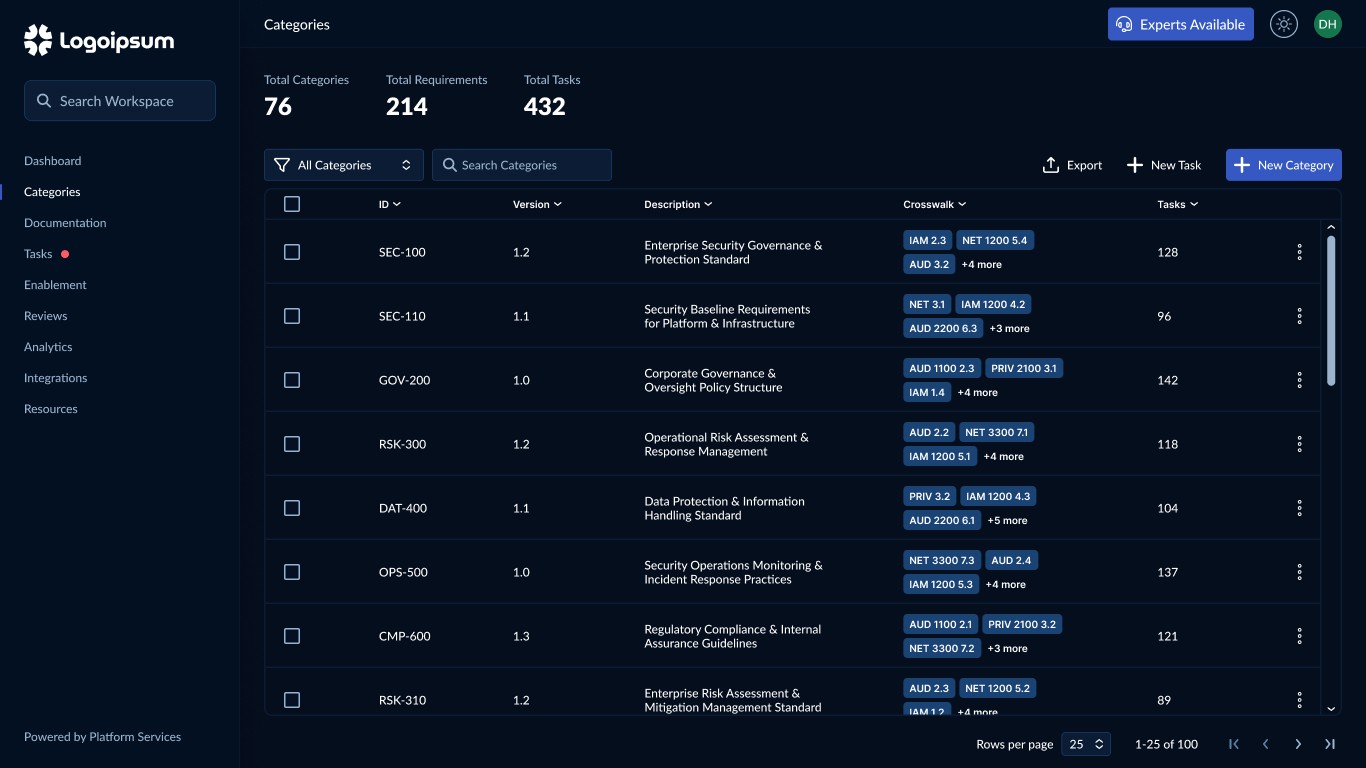
Representative screens demonstrating the application of standardized templates across multiple workflows, including table-based layouts, content management, and expandable data patterns. All content has been anonymized and generalized for NDA compliance.
Outcomes & Impact
Design System Foundations
The project established a scalable design system that provided a consistent visual and structural framework across the platform. By translating standardized templates into shared tokens, components, and layout patterns, the system created a unified foundation for building and scaling new interfaces
Key outcomes included:
Consolidated over 180 individual wireframe screens into approximately 40 reusable templates
Established a token-driven design system aligned between Figma variables and the codebase
Standardized complex UI patterns, including tables, flyouts, and multi-step workflows
Enabling Scalable Product Development
With the implementation framework in place, designers and engineers were able to build new workflows using shared templates and reusable components rather than starting from scratch.
This shifted development from one-off screen creation to a system-driven approach, significantly improving consistency and reducing implementation overhead.
Key outcomes included:
Enabled consistent implementation through shared tokens, templates, and component patterns
Reduced design and development time by reusing standardized layouts across workflows
Improved cross-functional alignment between design, product, and engineering
Created a scalable foundation for future features to be built more efficiently
This transformation enabled the platform to scale its interface without introducing additional visual or structural inconsistencies.